Posts

How to use HTML lists elements
Image
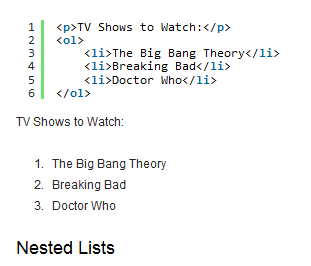
 In one of my posts, I taught you how to make table and I also stated that table can be use to hold items or names of people. But in case you are not okay with table, you also have html lists elements. What really make list interesting more than table is that, you can choose to number it or use bulletin. Although, you add those numbers and bulletin too in table but you do it manually, while with list elements, it will be added automatically. There are two types of html lists. The ordered html list and unordered html list. Below are the lists elements; Ordered html element. <ol> </ol> List html element. <li> </li> Unordered html element. <ul> </ul> List html element.<li> </li> Now let's move into the real practical part of the list making. ordered html list example; <! html DOCTYPE> <html> <head> </head> <body> <ol>  <li> Love </li> <li> Life </li> <li> Light </l...

CSS attributes and their effect

Image
  Today I want us to discuss about css attributes and their contribution to the language. Without these attributes css can't do much. But these attributes are not the much important tools for css. The styling language has bounce of elements to work with, but I bet, there are so many you will always skip when designing website. So very quickly, let me list the attributes we are to discuss now. Id attribute class attribute style attribute Maybe along the way you might come across more attributes, but these are ones we are going to talk about. Now let me explain one after the other. The id attribute is css attribute or tool use for naming html element for separate styling purpose.  The class attribute does same work with the id attribute. You use the class attribute in place of id, same thing to class. The style attribute actually seems like html attribute, but it actually belong to css.  The style attribute helps us style a single element within the element. Why I said it s...

Primary steps to know genuine app or blog content in search engines

Image
  Most people know how to use search engine to get information on the internet, but only few know how to get verified content. You may ask, what is verified content? When I mean verified content, I referring to genuine information. So, in today's lesson, I going to educate you on how to get or know legit information on the internet. When you type a search keyword on search engine input field and hit enter. There is going to be a lot information that will pop up. Both fake and real ones, but I guess getting the real one is a bit confusing. First thing is, those websites making review about the particular app or website. Is their url secured? Is it a popular website people rely on? Second thing is, how many different websites write review about this stuff you are looking for? Final thing is the comments on those review websites. What are those people who have tried the app or service saying about it. Note: If a website write review about a product or service, but the comment section ...

how to create new page on blogspot site

Image
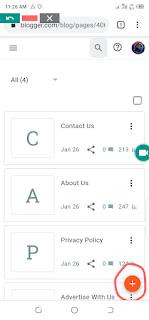
 My teaching always specialised on blogger only. So I'm going to teach you how to add those important pages for adsense approval. Before we move, I'm going to tell you why you need the above mentioned pages. Apart from those pages, you can use page creation to create a page that can contain specific information. I can boldly say, creating page is not limited to adding about us, contact us and privacy pages. Google AdSense need those pages because they make you open to your readers. Follow the steps below to and page in your blogspot site; Go to your blogger dashboard, click the menu icon and scroll down to pages. Click pages. When the next open properly, you will see the + icon telling to add page. Click on the + icon, then write the page title, and write the page content and click publish. Wow! You have successfully added new page in your blog. I'm always available for reply your comments.

Tips on how to connect domainking domain to blogspot blog

Image
 For those readers sending me emails, asking how to connect their domain name on domainking to a blogger blog. Here I come. I want to quickly teach you domain to blogspot blog. So I've already bought my domain. Quickly we are going to run through it.  Note: I'm doing this on automatic method. In other words, we are going to submit the name and the destination of the domain to domainking for automatic connection. So let's get started! Head go domainking domain name management area. And open another tab and go to your blogger dashboard and click the menu icon, click settings, then scroll down to CUSTOM DOMAIN. Now click the custom domain and enter your domain name and hit the SAVE button. Now blogger will send you error report containing your domain address and destination. At this point, what you need to do is to copy the name key and paste it on the domain management name input field and also do copy destination key and paste it on the value input field as shown on the scre...

Tips to fix ads.txt file missing AdSense issue

Image
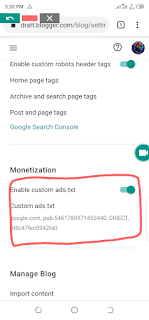
 Are you facing ads.txt file missing challenge on your AdSense account? Worry not, I got you covered.  Briefly, I want to show you how to fix your ads.txt file missing problem. When you login your AdSense account, you get to see notification on top of your account. From that notification end, you will see 'FIX NOW' link, click it and new window will open. From that new window, hit the download button and a let file download to your device. Now, after you have downloaded the file, go to your device download folder and open that ads.txt you downloaded. Now, if you are using Windows computer, open the file on notepad and copy the code and head to your blogger dashboard. When you get there, click on menu, the select settings, scroll down to monetization 'custom ads.txt' click it and paste the code you copied easier and put on the enable ads.txt button. Adding ads.txt file in manually created website.  So you already downloaded the file, right? Now go to your control panel a...

Guide to add blog URL to Google search console

Image
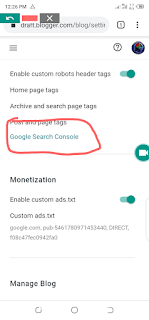
 In one of my recent blog posts, I explained how to submit your blog for AdSense approval and things you should do first before applying. Now, in this post, I want to teach you how to add your blog url to Google search console. maybe, you might ask why this is important. Calm down, I will explain why you need to add you blog to Google search console. For you to get better traffic result in blogging, your blog need to rank high in search engines. And Google is the world's number #1 search engine. So making your blog to show on search engines will fetch you a lot organic traffic. Now you see why you should consider adding your blog url to Google search console? This is exactly what I'm going to teach you on this post. mind you, I'm making this post for Blogspot users. So first, go to your blogger dashboard and click to open the menu tab, scroll down a bit and click settings. When the settings menu come up, scroll down and click Google search console. Now when the Google searc...

Step by Step guide on How to Apply For Google AdSense

Image
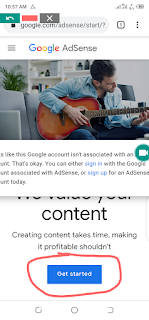
 Hi great readers! Today is a great day as I'm here to show you how to apply for Google AdSense. before we get to the main content of this article, I will also tell you things need to do before submitting your blog for Google AdSense. Basic, you need to add about us, contact us and policy and privacy pages. AdSense value these pages because these pages tell AdSense how serious you and also how your readers can contact you for any help. Second thing is making your blog appear on Google search engine. This another thing, else AdSense will not know your blog and it will take long for AdSense will reply you. Things should not bother yourself with; blog age doesn't matter. domain age doesn't matter. blog traffic doesn't matter. articles amount doesn't matter. So now let's dive into submitting your blog for AdSense approval. Open new browser tag and head to https://www.google.com/adsense/start/ and click on the get started button, then enter your blog url in the prov...

Five reasons why you should monetize your blog with Google AdSense

Image
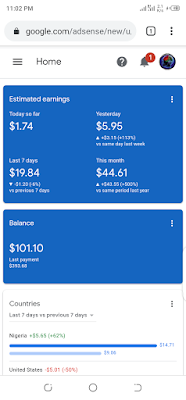
 So many of my friends always say Google AdSense is harsh. I don't know your experience with AdSense, but I need five minutes of your time to tell you five things  why Google AdSense is trusted and reliable and why you should monetize your blog with AdSense. If someone have ever told you that earning with AdSense is hard, don't listen to such big lies. I believed this fake story once, but I got to found out the truth. Making money from Google ads is actually easy if you are dedicated blogger. So, in this article, I want to tell/show you five reasons why you should monetize your blog with AdSense. Before then, let me give you highlight of things you should do before applying for Google AdSense. Read about them Make sure your blog comply with their policies Add about us page Add contact us page Add policy and privacy page Add up navigation bar/menu Let your blog be copy content free So let's dive into our main topic Reason one: Google AdSense is easy to setup. This is the nu...

JavaScript vs PHP

Image
 So much confusion among new babies programmers. I have heard people talked so much about JavaScript and php. They often compared the two programming languages. So today, I want to briefly explanation about their differences. I will talk what php can do and cannot do and also things programmer can do with JavaScript and can't do. First, let's look at what JavaScript can do that php cannot do. JavaScript is front end programming language, while php is band end programming language. The word front end meaning dealing with web ages off from server side. A programmer can use JavaScript to build web page animations, styling web page and can even send input field content to php. Things JavaScript can do; Making animations Styling pages Sending form data to php Fetching content from php Making web page auto refresh Things JavaScript cannot do; Can't fetch content from server direct Can't send form data to server direct If a programmer use JavaScript, HTML and CSS to make a web...

Some HTML Basic Coding Mistakes to Avoid

Image
As technology grow day after day, so as developer keep updating browsers version.   Today, I want to discuss with you few mistakes you should avoid while coding HTML page or pages. Like every other languages, HTML is sensitive and must be write in a good order to avoid slow loading, malfunction of your web application. So, below I listed three mistakes you should watch out for when coding. 1. Closing tags: the closing tag (s) are important. Never leave these tags out because it will course your web page not be responsive to different device screen. And it will make your page to load slow. <body>  correct <\body> <body> wrong  (no closing tag) 2. Another big mistake many make is by  forgetting to put the forward lash in the closing tag. As we all know, so many elements have opening and closing tag. There different in between them is that the opening tag have forward lash, while the closing tag has it. Forgetting to add it is a harmful way of writing ...

Best seo guide for beginners

Image
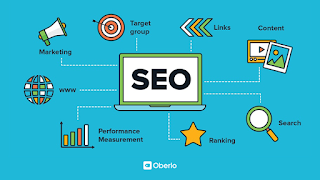
Hmmn! actually SEO is HUGE. The most important word here is optimization. So, it qualifies the word “Search engine". It's important to note that optimisation is not meant for Google alone, it's general for every seach engine. Optimization is making your website to abide by the rules of operation of search engines so that when a user types a keyword on Google or any search engine, your content may be ranked and resulting to your site being listed on SERP (Search engine result page). Unfortunately, your content alone will not make your site appear on the first page. There are plenty of things it entails, especially link building, which I think is the most important thing to do when optimizing your website. Onpage SEO is when you optimize your content like adding alt attribute to your images, making keyword research and using that keyword in your header and content, including setting key phrase. Offpage SEO means working on your Domain authority and Page authority which is an...

Inserting Image in HTML Page

Image
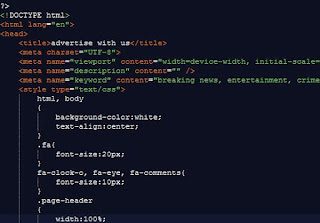
Photo is an essential thing when you are to make a web page look beautiful. Images is not just for making website background, but for other purpose like; dynamic user profile picture, post content picture. The list is endless. That’s why I always tell my readers that, learning how to add image to web page is important. I’m really happy to tell you that today we are going to add image on html web page. Basically, there are three method for adding image/photo to html page. We’ll cover these easy three steps in this guide. In one of our past guides, we discuss on how to style html page. We learnt three ways, which are “inline styling” “eternal styling” and “external styling”. Same thing apply to adding image on html page. What is HREF in coding? Method 1: This method is very simple. We’ll make div element and add image as the background-image for the div. This background will only cover the shape of the div. In other words, it will only take the...

HTML HREF Attribute in Coding

Image
HREF is html link attribute that enable movement from one web page to another freely. As websites are made up of multiple web pages, for movement from one page to another is possible only with href link attribute. Many web designers don't really know the full meaning of  'HREF link attribute' despite using it regularly. In this guide, we'll treat the subheading listed below. What Does Link 'HREF' Stand For? How to Use Link HREF Attribute? How to Use Link TARGET Attribute? Without the 'href' html link attribute, no web app can achieve its purpose because there will be no movement within the app. Imagine opening a web app and you are just stuck there, no next page, no previous page. This will be annoying and frustrated. HREF stands for ' Hypertext Reference (H-Hypertext REF-Reference) '. Of course we all is aware what the word reference means. It means referencing to another file or page. Website like w3schools will be of a good...

HTML basic guide For Beginners

Image
I've posted so many HTML tutorials in this blog. but I make this one unique in other to make every interested beginner to understand the basic things. I hate writing a lot of text, confusing readers. That is why I always put my best to present easy examples to give better understanding. Read:   How to create new post on nairaland forum  Basic Things We Are Going to Learn in This Guide What is HTML Stand For? HTML5 Document Declaration What are HTML Elements and Tags? What is HTML 'head' Element? What is HTML 'title' Element? What is HTML 'body' Element? We will treat one after the other as they're listed above. So let's start with the first one in the list. Read:    HTML web page linking guide     What is HTML stand for? HTML stand for 'Hypertext Mark-up Language' it is the document mark-up language used in building websites or web apps from scratch. Those shapes you always see on w...